
Why Emails Going to Spam (And How to Fix It)
If your emails are going to spam instead of reaching the inbox, email providers have likely detected authentication, reputation, or sending pattern issues.
Spam filters used by Gmail, Outlook, and other email providers analyze dozens of signals before deciding whether a message should reach the inbox. Authentication records, domain reputation, sending patterns, and user engagement all influence this decision.
When one of these signals appears suspicious, email providers may route messages to the spam folder to protect recipients. Understanding these signals makes it possible to diagnose and fix deliverability problems before they affect outreach campaigns.
Common Reasons Emails Land in Spam
Emails usually land in spam folders because email providers detect signals suggesting the sender may be untrusted or sending unsolicited messages. Modern spam filters evaluate technical configuration, sender reputation, and user engagement before deciding inbox placement.
If authentication records are missing or sending patterns look suspicious, spam filters may automatically redirect messages to spam folders.
- Missing or misconfigured SPF, DKIM, or DMARC authentication records
- Poor domain reputation
- Sending too many emails too quickly
- Spam trigger content or formatting
- Improper cold email infrastructure setup
Proper email authentication is critical for inbox placement. If these records are missing or misconfigured, follow this SPF DKIM DMARC setup guide to configure them correctly.
How to Fix Emails Going to Spam Issues
Fixing email spam problems usually requires addressing both technical infrastructure and sending behavior. Running regular email deliverability testing helps identify authentication errors, spam triggers, and domain reputation problems before outreach campaigns scale.
Once these factors are configured correctly, spam filters are more likely to trust your sending environment.
- Configure SPF, DKIM, and DMARC authentication
- Warm up new domains and inboxes gradually
- Distribute sending across multiple inboxes
- Avoid spam trigger phrases and formatting
- Monitor domain reputation regularly
If authentication or infrastructure issues are detected, a proper cold email infrastructure setup may be required to rebuild your sending environment.
How Spam Filters Evaluate Emails
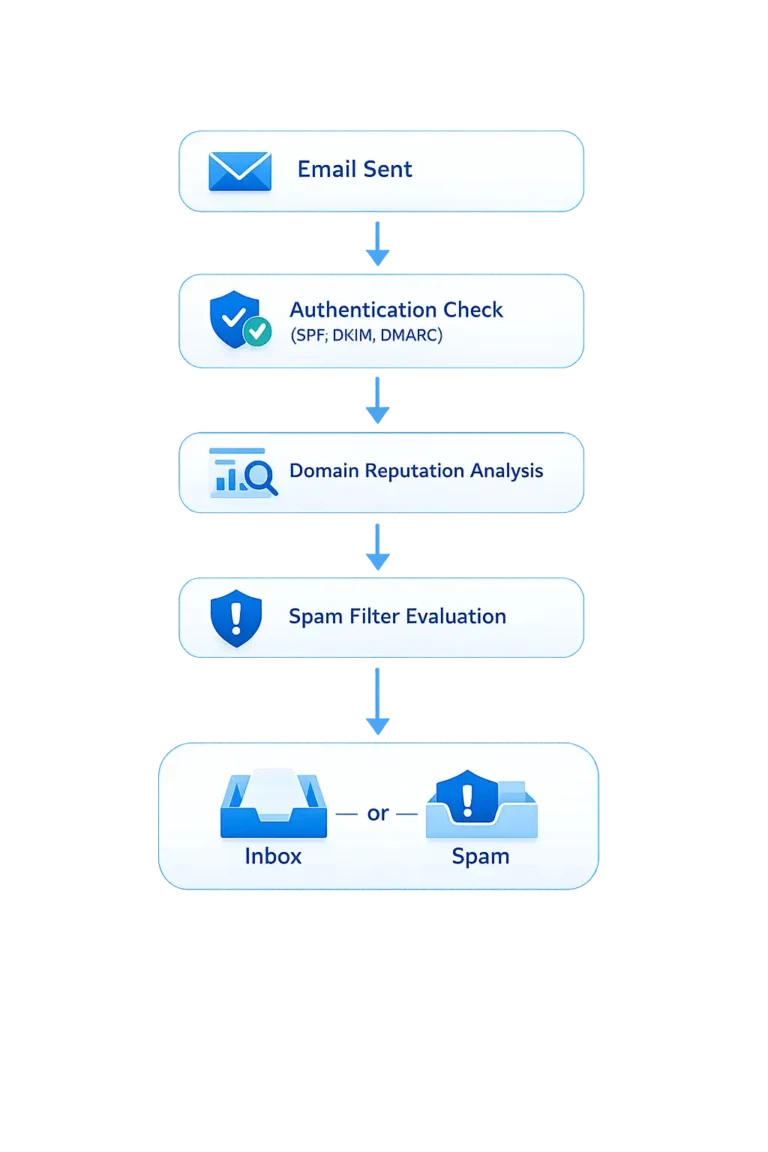
Email providers like Gmail and Outlook use advanced spam filtering systems that analyze multiple signals before deciding whether a message should reach the inbox.
These systems evaluate sender reputation, authentication alignment, engagement signals, and sending patterns to determine whether an email appears trustworthy. Understanding how spam filters work helps diagnose emails going to spam before they impact outreach campaigns.
Spam Filter Evaluation Signals
| Signal | What It Means |
|---|---|
| Domain Reputation | Measures how trustworthy your sending domain appears to email providers. |
| SPF Authentication | Confirms that the sending server is authorized to send emails from the domain. |
| DKIM Signature | Ensures the message has not been altered during transmission. |
| DMARC Policy | Defines how email providers handle authentication failures. |
| Engagement Signals | Open rates, replies, and recipient interactions affect inbox placement. |
How to Prevent Emails Going to Spam
- Authenticate every sending domain
- Warm up domains gradually
- Limit daily sending volume
- Maintain positive domain reputation
- Monitor deliverability metrics regularly
You can check your domain reputation using MXToolbox.
Need Help Fixing Email Deliverability?
If your emails consistently land in spam folders, professional deliverability diagnostics may be required.
Emails Going to Spam FAQs
Why do my emails go to spam?
Emails usually go to spam when authentication records such as SPF, DKIM, or DMARC are missing or misconfigured. Poor domain reputation, sending large volumes too quickly, or spam trigger content can also cause messages to be filtered into spam folders.
How can I stop emails from going to spam?
Stopping emails from going to spam requires proper authentication, gradual domain warmup, controlled sending volume, and maintaining strong domain reputation. Monitoring inbox placement regularly helps detect deliverability issues early.
Does SPF DKIM DMARC prevent spam filtering?
SPF, DKIM, and DMARC authentication help verify sender identity and protect domains from spoofing. While they do not guarantee inbox placement, properly configured authentication significantly improves email deliverability.SPF, DKIM, and DMARC authentication help verify sender identity and protect domains from spoofing. While they do not guarantee inbox placement, properly configured authentication significantly improves email deliverability.
How do I test if my emails reach the inbox?
Inbox placement can be tested using deliverability tools that send emails to multiple providers and analyze whether messages reach inboxes or spam folders.