
Microsoft 365 Reseller Pricing – Outlook Inbox Setup Included
Buy Microsoft 365 (Outlook) inboxes at reseller pricing with setup included. We handle inbox creation, DNS configuration, and basic deliverability so you can start sending safely.
Microsoft 365 Inbox Pricing (Standard)
Microsoft 365 inboxes are billed at reseller cost.
- $3.5 per inbox per month
- Inbox setup included
- DNS & basic deliverability configuration included
- Suitable for founders, sales teams, and outbound setups
Microsoft Azure Bulk Inbox Option
For larger teams and agencies, we offer a Microsoft Azure–based inbox setup.
- $25 per month
- 1 domain
- Up to 100 inboxes
- Best for scale and high-volume operations
Email Deliverability & Domain Authentication Explained
Cold email success depends heavily on infrastructure, not just copy or tools. Email providers like Google and Microsoft analyze authentication records, IP trust signals, inbox aging behavior, and sending consistency before placing emails in the Primary inbox.
Domain authentication for cold email includes:
• SPF alignment
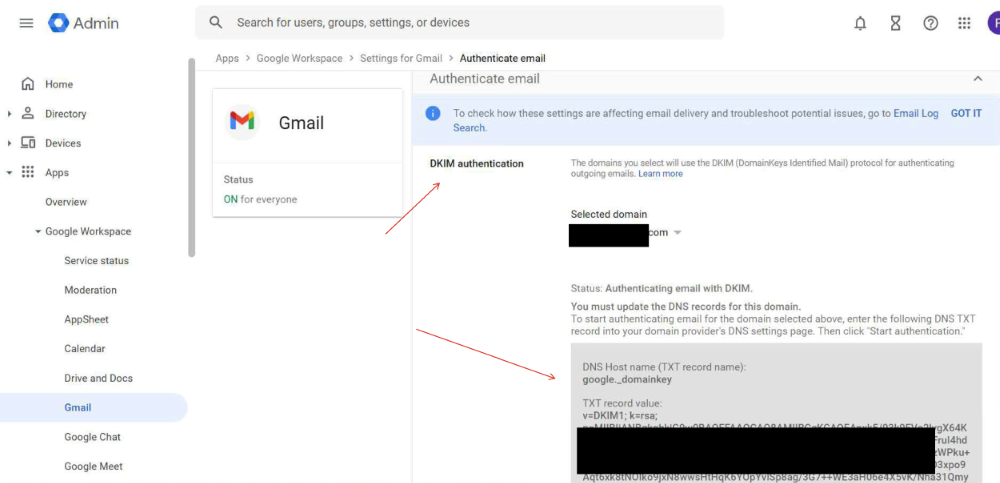
• DKIM signature validation
• DMARC enforcement policy
• Proper MX configuration
• Gradual inbox warmup
When authentication is missing or misconfigured, emails may technically send but silently land in Spam folders. This damages domain reputation and reduces long-term performance.
As a reseller provider, we configure everything from day one to ensure your email deliverability setup supports safe scaling and reputation management.
The goal is stability, not short-term volume.
Why Choose Microsoft 365 for Cold Email?
Microsoft 365 (Outlook) provides a reliable alternative to Google Workspace for cold email campaigns. When configured correctly with SPF, DKIM, and DMARC authentication, Microsoft 365 inboxes can maintain strong deliverability and domain reputation.
Email deliverability depends on proper domain authentication, sending behavior, and inbox warmup. Without correct setup, even official Outlook accounts can land in Spam.
As a Microsoft 365 reseller, we handle inbox provisioning, DNS configuration, authentication alignment, and deliverability safeguards. This ensures your cold email infrastructure is ready to scale safely.
For agencies and larger outbound teams, Microsoft Azure bulk setups allow structured scaling with domain isolation and reputation control.
Microsoft 365 Reseller for Scalable Cold Email Campaigns
Working with a Microsoft 365 reseller ensures that your cold email accounts are configured correctly from day one. Instead of simply purchasing inboxes, you receive properly authenticated accounts with SPF, DKIM, and DMARC aligned for deliverability.
For growing outreach teams, a Microsoft 365 reseller setup makes scaling safer. Multiple domains can be structured properly, sending limits can be controlled, and reputation can be managed long term. This reduces the risk of spam placement and protects your primary business domain.
If you plan to scale outbound campaigns gradually, using a trusted Microsoft 365 reseller provides stability without technical complexity.
Which Microsoft Option Is Right for You?
Choose Microsoft 365 Standard if you need a small number of reliable inboxes with minimal setup.
Choose the Azure option if you need bulk inboxes, agency-level scale, or advanced infrastructure.
SETUP questions
Get Microsoft 365 (Outlook) inboxes at reseller pricing with full setup included. We handle SPF, DKIM, DMARC, DNS configuration, and cold email deliverability. Below are answers to common questions about Microsoft 365 (Outlook) setup.
Microsoft 365 Reseller FAQs
Q1. Is this official Microsoft 365?
Yes. We provide official Microsoft 365 and Outlook inboxes at reseller pricing.
Q2. Is setup included?
Yes. We configure DNS records, SPF, DKIM, DMARC, and inbox settings.
Q3. Can I scale with Azure?
Yes. For bulk setups, Microsoft Azure allows structured domain-based scaling.
Q4. Is Microsoft 365 safe for cold outreach?
When properly configured with authentication and controlled sending limits, it supports cold email safely.
5. How long does setup take?
Most setups are completed within 24–48 hours.
Already Have Inboxes?
If you already have Microsoft inboxes or need infrastructure-only setup, we provide standalone deliverability and scaling services separately.