
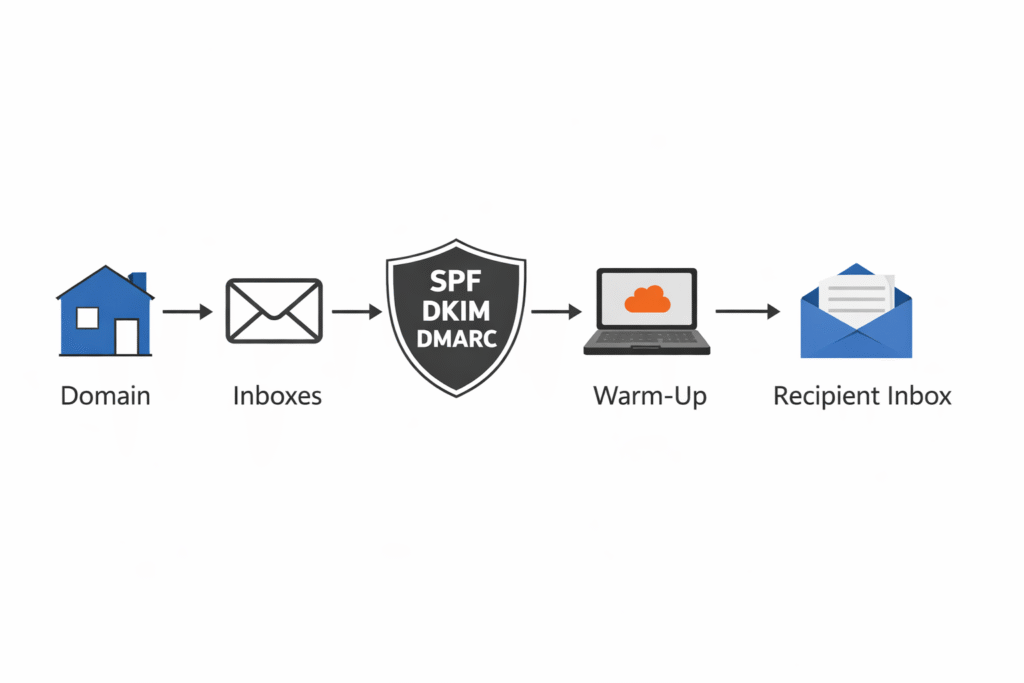
If you are planning to run outbound campaigns, understanding how to set up cold email infrastructure properly is critical. Many businesses fail not because of weak copy, but because their technical setup is incorrect.
Cold email infrastructure includes domains, inboxes, authentication records, sending limits, and reputation management. Without proper configuration, emails land in spam even before prospects read them.
This guide explains how to set up cold email infrastructure step by step in a way that is safe, scalable, and optimized for deliverability.
Step 1: Choose the Right Domain Strategy
The first step in setting up cold email infrastructure is deciding which domain you will send from.
Never use your primary business domain for cold outreach. Instead, use:
• A secondary domain
• Or a subdomain dedicated to outreach
For example:
Main domain: company.com
Sending domain: companymail.co
This protects your primary brand domain from potential reputation damage.
Domain isolation is one of the most important long term strategies for safe cold email.
Step 2: Set Up Professional Inboxes
Once you have your sending domain, you need to create inboxes.
Most outreach setups use:
• Google Workspace inboxes
• Microsoft 365 inboxes
For safe sending, use 2 to 3 inboxes per domain. Each inbox should send limited daily volume.
Avoid sending high volume from a single inbox. Distribution improves stability.
If you are unsure which provider to choose, compare deliverability and scaling options between Google Workspace reseller and Microsoft 365 reseller environments.
Step 3: Configure SPF, DKIM, and DMARC
Authentication is the backbone of cold email infrastructure.
SPF defines which servers can send emails from your domain.
DKIM adds a cryptographic signature to verify message integrity.
DMARC sets enforcement rules and reporting policies.
These records must align correctly. Misalignment can cause silent spam filtering.
After adding DNS records, always verify authentication inside your email provider dashboard.
Authentication alone does not guarantee inbox placement, but without it, success is unlikely.
Step 4: Warm Up Your Inboxes
New inboxes have no sending history. Sending 50 emails on day one signals suspicious behavior.
Warmup involves:
• Gradually increasing daily sending volume
• Receiving positive engagement signals
• Maintaining low bounce rates
Start with low volume and scale slowly.
Inbox warmup protects reputation during the early phase of outreach.
Step 5: Set Safe Sending Limits
A common beginner mistake is sending too many emails per inbox.
Safe sending often looks like:
20 to 40 emails per inbox per day
2 to 3 inboxes per domain
Scaling should come from adding domains, not increasing volume per inbox.
Structured scaling protects long term deliverability.
Step 6: Monitor Reputation and Performance
Cold email infrastructure is not static. Ongoing monitoring is necessary.
Track:
• Bounce rate
• Spam complaints
• Open rate trends
• Blacklist status
If bounce rates increase, pause campaigns and investigate domain health.
Reputation management separates professional setups from risky outreach.
Step 7: Scale Using Structured Infrastructure
When campaigns begin generating replies, scaling becomes necessary.
Instead of increasing daily limits aggressively:
• Add new domains
• Create additional inboxes
• Warm them up gradually
This method supports consistent growth without damaging reputation.
For agencies and larger teams, structured infrastructure planning is essential for safe expansion.
Common Mistakes to Avoid
When learning how to set up cold email infrastructure, avoid these errors:
• Using your primary domain
• Skipping DMARC setup
• Sending high volume from new inboxes
• Ignoring bounce rates
• Scaling too fast
These mistakes reduce deliverability and harm domain trust.
When to Consider Professional Setup
Setting up infrastructure manually is possible, but small errors in DNS configuration or authentication alignment can impact performance.
If you want inboxes configured correctly from day one, structured cold email infrastructure setup services can eliminate technical risk and speed up launch time.
Professional configuration ensures:
• Authentication alignment
• Domain isolation
• Safe sending structure
• Scalable architecture
Learning how to set up cold email infrastructure properly is the foundation of successful outreach. Domains, inboxes, authentication, warmup, and sending limits all work together to influence deliverability.
Outbound campaigns are technical systems. When infrastructure is stable, performance becomes predictable.
If you plan to scale cold email long term, build your infrastructure carefully and expand gradually.